How to reduce no-shows at events
People not saving events are 5x more likely to miss them. Reduce no-shows by adding one-click calendar buttons and automated reminders to your.
Subscribe to receive articles directly in your inbox
Practical tips to get more people to show up: event promotion, RSVPs and calendar marketing. No spam, unsubscribe anytime.


Why calendar links beat reminder emails
An Add to Calendar link puts your event straight into your guest's own calendar. One click is enough, and the reminder pops up 30 minutes before it starts.
- Works with Google, Apple, Outlook, Office 365 and Yahoo
- Every guest sees the event in their own time zone
- Meeting links are included in the invite
- See how many people added your event
How to create your first calendar link
Create an event, share the link and follow the results, as explained in how it works.
- Add a title, date and time
- Choose a location or paste a meeting link
- Share the link in your email or on your website
- Follow views and calendar adds

Use calendar links in every campaign
Put the same link in your newsletter, on social media and on your website, and see which channel brings in the most calendar adds.
Collect RSVPs for your next event
Ask guests if they are coming, collect custom answers and export the guest list in one click.
“The best-performing call-to-action is Add to Calendar.”
Which event are you planning next?
Start with a free account and create unlimited events with CalendarLink. No credit card required.
You can reduce no-shows at events by securing a spot on your attendee's personal calendar the moment they register. While confirmation emails often get buried in crowded inboxes, putting accurate dates, links, and automated notifications directly inside Google Calendar, Outlook, Apple Calendar, or Yahoo keeps your event visible on the screen your attendees check throughout the day.
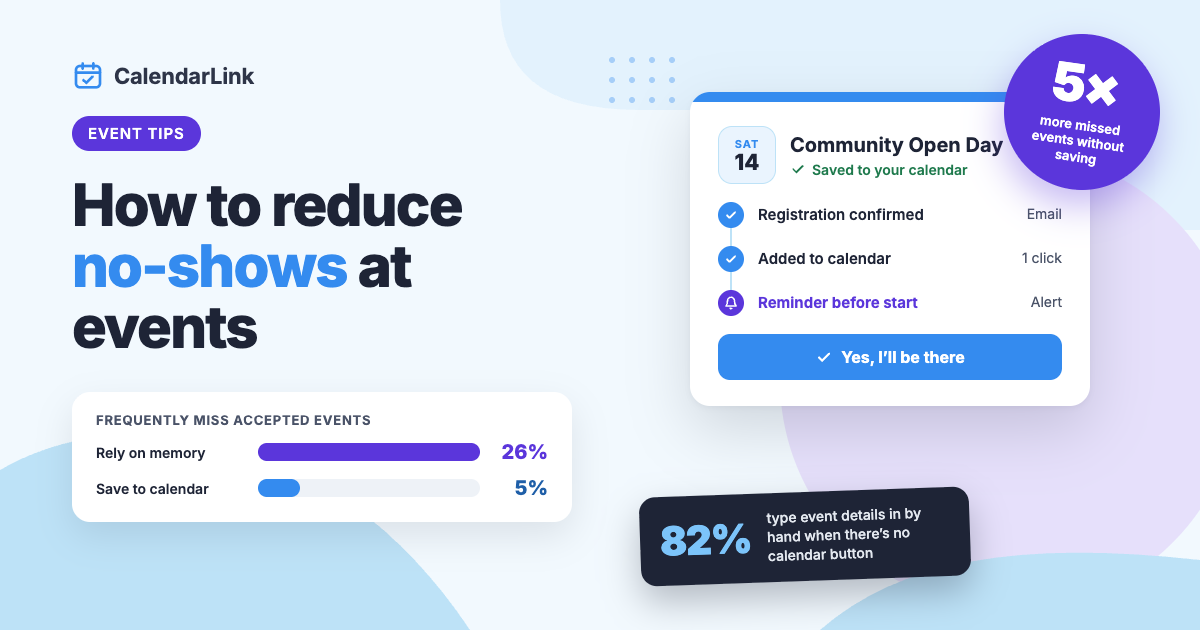
A CalendarLink survey of 1,996 invitees in 62 countries, conducted between 24 September and 14 October 2026, found that 41% miss an event they accepted at least sometimes, while 9% do so often or very often. These figures describe self-reported missed-event frequency among invitees, not an average event no-show rate. When we asked attendees what they would have done if an event page lacked an "Add to calendar" button, 14% (1 in 7) said they would rely on memory or do nothing at all. Even more telling: people who would not save an event to their calendar miss accepted events frequently 5 times as often (26% often or very often) compared to people who save events manually (5%). The difference between an empty room and a full room often comes down to proven strategies that bridge the gap between signing up and showing up.
Key takeaways
- People who rely on memory or do nothing miss accepted events frequently 5 times as often as those who save events manually (26% versus 5%).
- 14% of invitees record nothing when an event page lacks an instant calendar option, leaving their attendance entirely to chance.
- Missed-event tendencies vary by format: 46% of people adding a webinar report missing accepted events at least sometimes, compared to 25% for conferences.
- Calendar friction is real: 82% of invitees attempt to type details into their schedule manually when a direct button is missing.
- Combining registration confirmations with automated personal calendar alerts protects your attendance without flooding attendee inboxes.
Make saving the event one click
To reduce no-shows at events, eliminate every point of friction between your registration form and the attendee's personal schedule. Asking registrants to open a separate calendar application, copy dates, and paste video links creates hesitation and input errors. When you provide a universal add event to calendar link, attendees add your session directly into Google Calendar, Outlook, Apple Calendar, or Yahoo with a single tap.
In our practice at CalendarLink, we see that invitees want to lock in commitments immediately. Without a direct button, 82% of respondents in our 2026 survey reported that they manually enter event details into their schedule. That manual effort invites typos in start times and missing video links. Another 4% grab a screenshot or save a message, while 14% do not record the date anywhere.
A single click reserves time on the attendee's schedule, stores conference room links directly in the entry, and schedules native device alerts before the session begins. Removing manual entry turns an initial interest into an anchored schedule block.
Put the calendar link in every reminder
Every pre-event communication you send should provide a direct calendar link so registrants who missed the initial confirmation can still block off the time. Relying on a single calendar button on day one leaves late planners behind. Placing functional calendar links inside your reminder sequence gives attendees ongoing opportunities to anchor the event into their personal workflow.
At CalendarLink, we often see organizers send regular email reminders containing plain text and video links, yet they forget to include calendar actions. If an attendee checks their phone between tasks, reading an email does not automatically place the session on their agenda. Adding smart links allows the recipient to tap once and sync the session without searching for the original confirmation note.
When planning reminder sequences, pair clean visual calendar links with precise agenda topics. A well-placed calendar link inside a 48-hour or 24-hour update turns passive readers into confirmed attendees who receive timely, native device notifications.
Send a day-of reminder through the personal calendar
Sending a calendar-level notification on the day of your event ensures your gathering appears during morning schedule reviews and right before your start time. Inbox notifications frequently get overlooked during busy workdays, but calendar alerts cut through noise by showing up directly on mobile lock screens and desktop notification panels.
CalendarLink configures automated event reminders directly through attendees' personal calendars, scheduling timed prompts 15 to 30 minutes before kickoff. Because these alerts stem from native apps like Apple Calendar or Outlook, they do not face spam filters or inbox promotions tabs. CalendarLink does not send general email marketing campaigns or SMS messages itself; instead, it delivers notifications straight through the calendar while external marketing tools manage your broader announcements.
For organizations running multi-part training programs or recurring workshops, managing individual calendar updates by hand becomes chaotic. Using a system to manage recurring events the smart way lets you maintain subscription calendars where date changes, new sessions, and reminder triggers sync across every subscriber's personal calendar automatically.
Track who saved your event and who did not
Monitoring calendar additions and RSVP behaviors lets you identify which promotional channels generate genuine interest and which ones produce passive signups. Calculating true no-show rates requires comparing your actual attendance records against registration counts and calendar saves. CalendarLink tracks event views, calendar additions, and RSVPs, with source tracking identifying registration or subscription channels.
These metrics show audience engagement rather than direct proof of attendance, so a formal no-show calculation always requires pairing CalendarLink data with live room check-ins. Analytics availability depends on your plan: the Free Plan includes no analytics, the Startup Plan provides simple analytics, and the Business Plan offers advanced analytics. RSVP lists can also be exported to Excel or CSV files for post-event reporting.
Organizers can share calendar links through existing marketing tools, using Smart Links, Zapier, and Make.com to trigger tailored workflows across their favorite applications. For advanced setups, teams can use an event automation platform to increase attendance and manage their operations cleanly.
Who is CalendarLink for?
CalendarLink is built for professionals and organizations that rely on dependable event attendance to hit their goals. Our platform supports webinars, workshops, online meetings, live events, and recurring event series by making it simple for invitees to save dates to their personal schedules.
Specific audiences that benefit from our platform include:
- Webinar marketers and growth teams who need to turn digital signups into active viewers across Google Calendar, Outlook, Apple Calendar, and Yahoo.
- Corporate trainers, educators, and HR leaders hosting workshops, onboarding cohorts, or compliance sessions who need reliable turnout without manual tracking.
- Event planners, conference organizers, and community managers coordinating group meetups, ticketed summits, or recurring member sessions.
How CalendarLink helps you cut no-shows
CalendarLink solves the attendance gap by connecting your event registration process directly to your attendees' personal calendars. We do not operate a standalone calendar app, sell tickets, or manage physical venue logistics; instead, we generate smart, universal calendar links that integrate with the tools your audience already checks every day.
Our platform supports webinars, workshops, online meetings, launch parties, and recurring event series. Organizers enter the event title, date, time zone, location or meeting link, and description, then generate one universal link that adapts to the attendee's local time zone across Google Calendar, Outlook, Apple Calendar, and Yahoo. You can customize event landing pages with your branding, embed RSVP forms with custom questions, and track engagement through exportable CSV files or direct platform analytics.
Whether you run single workshops or recurring series, CalendarLink bridges the gap between registering and showing up.
Frequently asked questions about how to reduce no-shows at events
What is the average no-show rate for events?
Average event no-show rates typically range between 20% and 50% depending on ticket cost, industry, and whether the event is virtual or physical. In CalendarLink's survey of 1,996 invitees, 41% reported missing events they accepted at least sometimes, with webinars showing higher missed rates than multi-day conferences.
How to reduce no-shows at events using automation?
To reduce no-shows at events using automation, connect your registration workflow to an engine that triggers instant calendar additions and scheduled device alerts. Tools like CalendarLink allow you to combine RSVP collection with universal calendar links, syncing event dates and video room links across Google, Outlook, and Apple calendars.
How to boost attendance at events before they start?
You can boost attendance at events by confirming time zones dynamically, selecting morning slots, and sharing calendar links in every pre-event message. Providing a one-click calendar save right after registration ensures the session is reserved on your attendee's schedule before competing daily priorities take over.
How to reduce no shows on recurring workshops?
To reduce no-shows on recurring workshops, provide a subscription calendar that syncs every upcoming session to your attendee's personal calendar in one step. Subscription calendars automatically push new dates, updated links, or rescheduled sessions directly to subscribers' calendars without requiring them to fill out new registration forms.
What are the 5 C's in event planning?
The 5 C's in event planning are Concept, Coordination, Control, Culmination, and Closeout. Concept establishes the theme; Coordination organizes scheduling, calendar links, and logistics; Control manages budgets and check-ins; Culmination covers live event execution; and Closeout handles post-event analytics, attendance tracking, and attendee follow-ups.
Transform your attendance rates with CalendarLink
Closing the gap between signups and actual attendees starts with securing a spot on your audience's personal schedule. When you eliminate manual data entry, confirm time zones automatically, and deliver alerts directly to personal devices, your check-in numbers reflect your audience's true interest.
Start using CalendarLink for free today to build universal add-to-calendar links, collect RSVPs, and turn your event registrations into reliable, active participants.