
The best time to host a webinar or event
Choosing the right slot on a calendar often determines whether your audience attends your presentation live or forgets it entirely. Deciding on the best time to host a webinar or event requires balancing participant work schedules, regional time zones, and the tools you use to confirm their attendance. When organizers align timing with calendar habits, overall turnout improves.
At CalendarLink, we study how people commit to digital meetings and physical gatherings. While countless guides suggest a single magical hour, real attendance patterns depend heavily on audience commitments and prompt calendar saving. In our own survey of 998 invitees across 62 countries, conducted between 24 September and 14 October 2026, 41% of respondents admitted that they miss an event they accepted at least sometimes. Furthermore, 9% miss accepted events often or very often.
What is the best time to host a webinar or event?
The best time to host a webinar or event typically falls between 10:00 AM and 11:00 AM, or between 1:00 PM and 2:00 PM in your target audience's local time zone. Mid-morning slots allow attendees to clear their early emails, while early afternoon slots catch participants before late-day fatigue sets in.
In our practical experience with thousands of digital gatherings, attendance peaks when organizers respect the natural rhythms of the workday. Early mornings before 9:00 AM often clash with school drop-offs, commuting, and urgent inbox triage. Late afternoons after 4:00 PM frequently see workers wrapping up deliverables, rushing to finish daily quotas, or disconnecting from screens. Mid-day lunch hours can work for casual brown-bag presentations, but they frequently lead to passive listening rather than active engagement.
Audience context dictates these windows. If you host an internal company training, a mid-morning block inside working hours ensures management support. If you run a consumer-facing product launch or a community gathering, evening slots or weekend mornings might be your only realistic option. Selecting the best time to host a webinar or event requires mapping your audience's daily responsibilities before sending out an invitation.
How does event timing affect missed attendance?
Timing directly influences how people manage their daily routines, but missed events are primarily driven by self-reported memory habits rather than the hour on the clock. Our research reveals that people who add evening events report missing scheduled sessions more frequently than those who register for morning sessions.
During our CalendarLink survey of 998 event invitees, we asked respondents who had just added an event to their calendar how often they miss an event they said yes to. When we broke down these responses by the scheduled time of the event, distinct patterns emerged across different parts of the day:
- Morning events: 33% of respondents who added a morning event reported missing events at least sometimes.
- Afternoon events: 43% of respondents who added an afternoon event reported missing events at least sometimes.
- Evening events: 50% of respondents who added an evening event reported missing events at least sometimes.
These figures represent self-reported habits, not measured no-show rates at individual sessions. Evening commitments face competition from personal errands, family obligations, and dinner plans. When work meetings run late, an evening webinar is often the first activity sacrificed.
For organizers, this means that scheduling an afternoon or evening event demands stronger follow-up mechanisms. Making it simple for guests to save an invite to their Google Calendar, Outlook, or Apple Calendar prevents those later sessions from slipping out of sight.
What days work best for live events and webinars?
Mid-week days like Tuesday, Wednesday, and Thursday consistently deliver reliable turnout for professional business sessions, while weekends remain practical for personal hobbies and social groups. However, our empirical research shows that registered attendees report similar overall forgetfulness rates regardless of whether an event is held on a weekday or a weekend.
Many organizers treat Mondays and Fridays as strictly off-limits. Mondays are filled with operational catch-up, team planning, and backlog clearing. Fridays often find professionals eager to wrap up the week, resulting in low energy for new educational content. As a result, mid-week slots remain the standard recommendation across corporate sectors.
Our survey data offers a valuable counter-perspective for community and social planners. When examining respondents who accepted invitations, the tendency to miss an event did not show a statistically significant difference between weekdays and weekends. The study also does not establish the best individual weekday. Any decision on the exact day must account for audience habits and content type.
If your audience consists of hobbyists, volunteers, or retail workers, a Saturday morning may generate far better reach than a Tuesday morning. The key is understanding who you are speaking to rather than blindly following corporate calendar conventions.

How should you handle multiple time zones?
Scheduling across multiple time zones requires identifying the overlapping business hours of your primary attendee clusters and using dynamic calendar tools that adapt automatically to each participant's location. A live session held at 1:00 PM Eastern Time lands at 10:00 AM Pacific Time, creating an ideal window for North American audiences. CalendarLink supports webinars, workshops, online meetings, and live events, so organizers can plan for local venues as well as international remote audiences.
When your audience spans continents, compromises become necessary. A slot that suits London in the late afternoon might catch New York at mid-morning, but it will exclude Sydney entirely.
To anchor your timing, determine where at least 60% of your target participants live. If the majority resides in Western Europe, schedule for 2:00 PM Central European Time. This window captures the local afternoon while allowing early risers on the US East Coast (8:00 AM) to listen in if they choose.
Never write a static start time without stating the time zone code and UTC offset. Better yet, remove manual mental math completely. Organizers can generate an add event to calendar link that automatically translates the scheduled start time into the viewer's local device clock, eliminating confusion over daylight saving discrepancies.
If your audience is evenly split across Asia, Europe, and the Americas, do not force everyone into a single uncomfortable hour. Host two shorter live cohorts, or offer a morning presentation and an afternoon repeat. When managing regular cohorts, you can manage recurring events the smart way by letting guests subscribe to an ongoing calendar series that keeps their local schedules updated whenever details shift.
Why calendar saving matters more than the clock
The actual hour you select matters far less if your registrants fail to record the event on their calendar when they sign up. Our data shows that people who do not save an event to their calendar are 5 times more likely to regularly miss events they agreed to attend.
In our study of 998 event invitees, we asked participants what they would have done if an "Add to calendar" button had not been provided on the event page. A notable 82% stated they would manually add the event to their calendar, while 4% said they would take a screenshot or save the email. Another 6% stated they would rely purely on memory, and 8% admitted they would probably do nothing. Altogether, 14% of invitees (1 in 7) do not record the date or time at all if a direct calendar option is missing. When looking at historical survey archives and past event reserach, this lack of immediate calendar integration remains a leading operational bottleneck.
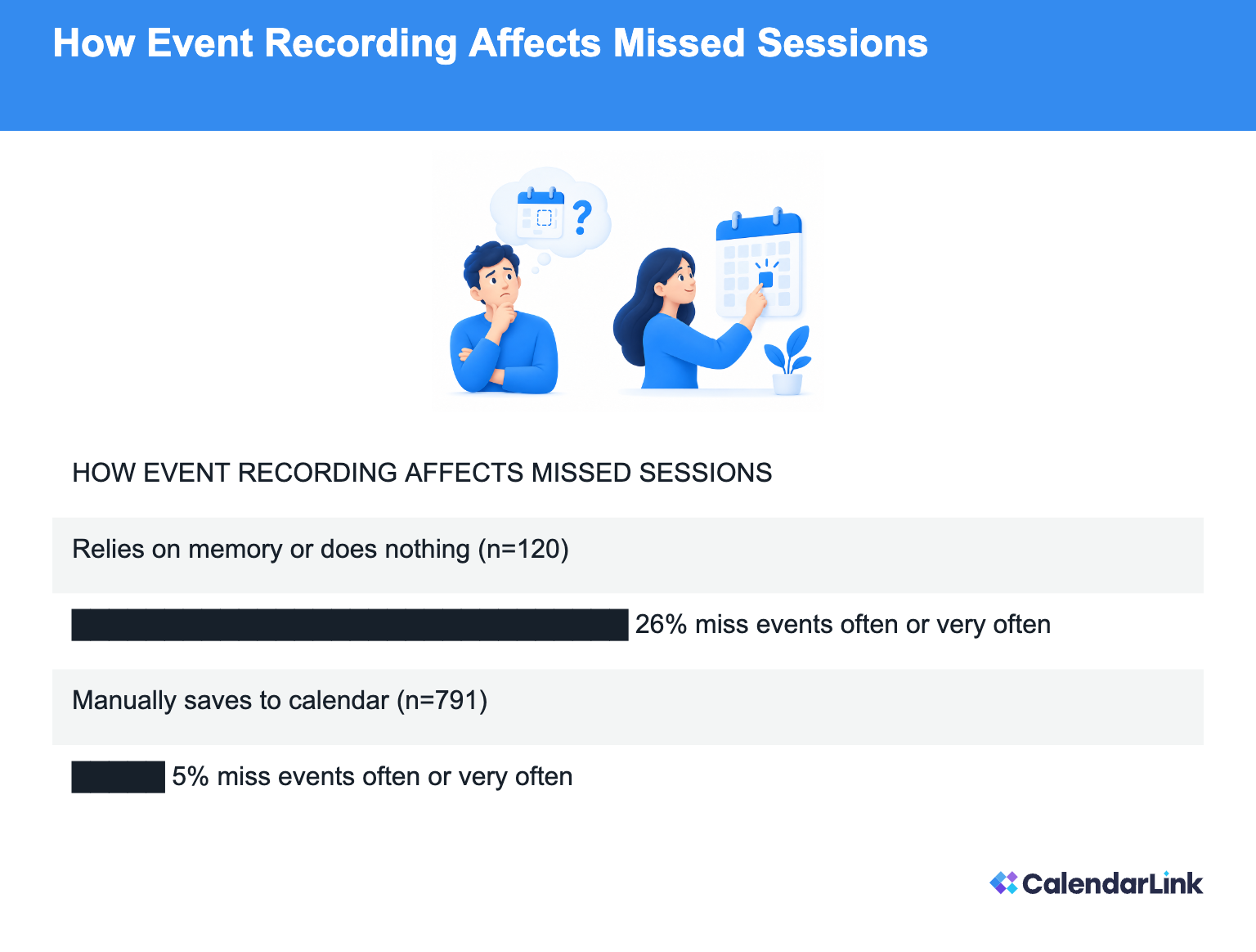
Invitees who rely on memory or do nothing report missing events often or very often 26% of the time, compared to just 5% among those who manually save the date. When looking at those who miss events at least sometimes, the figures stand at 64% versus 35%.
These findings indicate that people who record events miss fewer of them. If you want higher attendance, you should make it effortless for your audience to save your session immediately after registration. Many event organizers use free event attendance tracking software to monitor their initial RSVPs while distributing universal calendar invitations in confirmation emails.
How CalendarLink improves your webinar workflow
CalendarLink provides an all-in-one event management platform designed to raise attendance rates and eliminate scheduling friction for organizers worldwide. Rather than sending static calendar invites that break across different platforms, CalendarLink generates a single universal link that works with Google Calendar, Outlook, Apple Calendar, and Yahoo. When an attendee clicks a CalendarLink button on your landing page or in your confirmation email, the link automatically detects their local time zone and places the event at the correct hour. Organizers can build customized event pages with their own logos, colors, and descriptions, creating a cohesive experience from invite to attendance.
Beyond link generation, the platform includes:
RSVP tracking and management: Create online RSVP forms with custom questions (such as dietary needs or role titles), export attendee lists to CSV, and let users add the session to their personal calendars upon registration. You can explore how to create RSVP link for event pages to see how this works in practice.
Subscription calendars: Build dynamic calendar feeds for ongoing webinars or fixture lists. When you update, move, or add a session, the changes sync automatically across all subscriber devices.
Event automation and tracking: Connect your calendar distribution to marketing platforms like Mailchimp, HubSpot, or WordPress using smart links, Zapier, Make.com, or direct API access. Many organizers use an event automation platform to increase attendance by generating links directly inside their CRM sequences.
Organizers can compare candidate time slots by looking at engagement metrics across different scheduled sessions. CalendarLink tracks event views, calendar additions, RSVPs, and acquisition sources. These interaction metrics should be tracked alongside webinar platform logs to evaluate attendance accurately. The Free Plan includes no analytics, the Startup Plan offers simple analytics, and the Business Plan provides advanced analytics.
CalendarLink operates online and requires an active internet connection. It does not provide built-in video conferencing or mass email services. Organizers embed their own meeting links and promotional resources into universal calendar invites. To prepare your virtual events, you can simplify virtual events with a webinar add to calendar link so that attendees save the video URL directly into their primary schedules.
Frequently asked questions
What is the best time host a webinar for international audiences?
The best time host a webinar for mixed international audiences is typically between 1:00 PM and 3:00 PM UTC. This window bridges European afternoons and North American mornings. It ensures that both regions can attend during normal working hours without requiring late-night or early-morning commitments.
How long is a webinar usually?
A webinar usually lasts 30 to 60 minutes, with 45 minutes being the standard format for corporate presentations. This runtime leaves 30 minutes for presentation material and 15 minutes for audience questions. Sessions longer than an hour generally experience higher attendee drop-off unless organized as interactive workshops.
What is the best day to host an event?
Mid-week days such as Tuesday, Wednesday, and Thursday are the most effective days for hosting professional B2B events. These days avoid Monday morning backlogs and Friday afternoon early departures. For personal, social, or community gatherings, Saturday mornings or Thursday evenings offer strong alternatives.
When to use Zoom meeting vs webinar?
Use a Zoom meeting when you require open collaboration, two-way screen sharing, and open microphones for small group discussions. Choose a Zoom webinar when hosting a large audience where you need strict host control, structured Q&A moderation, and attendees who view without turning on their microphones or cameras.
Do you attend or participate in a webinar?
You attend a webinar when you observe a presentation, listen to speakers, and submit text questions through a moderated chat or Q&A module. You participate in an interactive meeting when you actively speak, share your camera, or collaborate in real time with the hosts and other guests.
Can CalendarLink send email invitations directly to attendees?
CalendarLink does not function as an email marketing platform or mass email dispatch system. It generates universal smart links that you place inside your existing email marketing campaigns, website buttons, or registration confirmation pages. CalendarLink then delivers reminder notifications directly through the attendee's personal calendar application.
Works with all tools you already know and love
No need to learn another tool. Just use your current (marketing) automation tool to send smart calendar links.


Ready to get started? Create your free account.
No credit card required.
✔ Unlimited events ✔ Adds-to-Calendar ✔ RSVP ✔ Subscribe-to-Calendar ✔ Notifications

